If you want to know how to clean PC dust safely without risking expensive components, start with the moment when your fans suddenly sound like a leaf blower and your frame rate drops for no reason. That’s usually dust. Not always, but usually. It packs itself into the heatsink fins and fan blades until your cooling setup basically can’t breathe anymore, and that’s when thermal throttling kicks in. So people grab a can of compressed air, which, fair enough, that’s what everyone’s used since forever. Except tilt that can even a little too far and you’re spraying freezing liquid propellant right onto a graphics card you paid real money for. It happens more than you’d think. And honestly, once you understand what’s actually inside those cans, it stops feeling like a fluke and starts feeling like something you could’ve predicted.
Quick Answer
Skip the disposable can. The safest way to clean PC dust is with a rechargeable electric air duster, it pushes plain, dry air through a fan instead of a chemical propellant, so there’s no liquid propellant that can spit onto your motherboard. Shut the PC down, unplug it, hold the fans still so they don’t spin while you’re blowing air across them, and do the whole thing outside or somewhere with decent airflow.
Why Canned Compressed Air Can Damage Your PC
Cans feel harmless because, well, they’re small and everyone’s grandpa used one on a keyboard at some point. But here’s the thing nobody tells you: that can isn’t full of air. It’s a liquefied gas under pressure, and tip it past a certain angle and liquid comes out instead of gas. Land that on a circuit board and you’re either dealing with cold-burn damage on the components or, worse, a short if the board still has any residual charge in it.
There’s a second issue too, and it’s the temperature drop. The longer you hold the trigger, the colder the spray gets, anyone who’s used one for more than a few seconds has felt the can itself turn icy in their hand. Blast that cold air onto a chip that was just running warm and you can get condensation forming once things equalize again. Water and circuit boards, obviously, don’t mix. And on top of all that, cans just don’t last. You’ll go through more of them than you expect for what amounts to a handful of cleanings.
How to Clean PC Dust Safely Step-by-Step
None of this is complicated. Most of the damage people cause happens because they rush or skip a step they didn’t think mattered. So here’s the safe way to clean pc components, in order.
- Power everything down first. Shut off the PC, pull the power cable, and if you’ve got the option, move it somewhere with decent airflow before you start. Cleaning a system that’s still plugged in is asking for trouble. After you unplug it, hold the power button for about 5 seconds to drain any leftover power.
- Keep the fans from spinning. This one surprises a lot of people, a fan blade spun far past its normal speed by a strong air stream can damage its bearings and may generate a small voltage. A finger, a chopstick, whatever you’ve got, just hold the blades still while you clean around them.
- Take it outside if you can. Clean inside a closed bedroom and most of that dust just hangs in the air for twenty minutes and drifts right back into the case. Outdoors, or near an open window with a door open too, gives it somewhere to actually go.
- Swap nozzles depending on the spot. A thin nozzle gets into tight areas like RAM slots or around the CPU socket. A wider one is better for the case interior and PSU vents. Switching between them beats trying to do everything with one setting at full blast.
- Finish with the exterior. Once the inside’s clear, grab a dry microfiber cloth for the case panels and front intake grille. If your case has removable dust filters, rinse them, dry them completely, and pop them back in.

Choosing the Right Tool for the Job
Okay, so once you’re off the disposable-can train, the real question is which electric duster is actually worth using. This is basically the whole electric air duster vs compressed air debate boiled down, it comes down to how much control you actually get over the airflow. You want enough power to move stubborn dust, more than one speed setting so you’re not blasting sensitive parts at full force by default, and nozzles that fit different jobs.

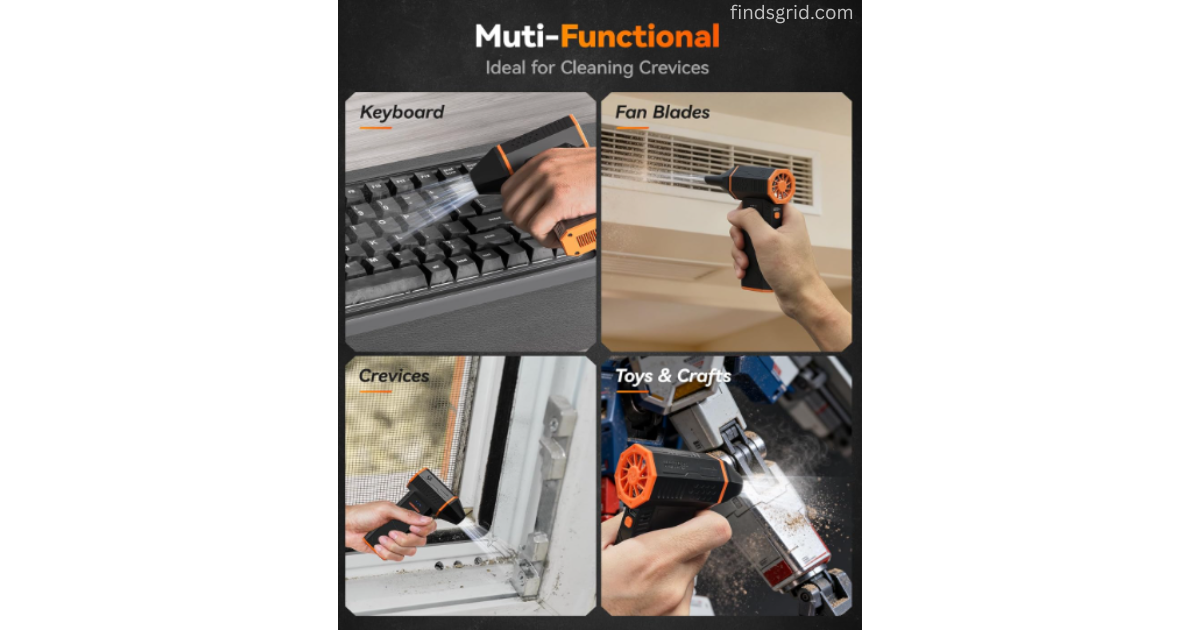
As one example, here are some specs of the WOLFBOX MegaFlow 50 Electric Air Duster, based on its listing (see our review for more). The turbo fan tops out at 110,000 RPM across three speed settings, so there’s room to dial it back for something delicate like RAM contacts and turn it up for the dust that’s been sitting in a case for a year. It weighs 0.45 lbs, which matters more than you’d think when you’re holding it steady for ten or fifteen minutes straight, your wrist notices. It ships with four nozzle attachments for switching between keyboards, vents, and tighter internal spots, and it charges over Type-C in roughly 3.5 hours, giving you up to 240 minutes of runtime on the lowest setting. That’s more than enough for several cleaning sessions before it needs to sit on the charger again.
3 Common PC Dust Cleaning Mistakes to Avoid
Even people who know better still mess this part up sometimes.
- Reaching for a household vacuum. Vacuums can build up static as air moves through the hose, and static near a circuit board is a bad combination, because it can damage sensitive components. Leave the vacuum in the closet.
- Not holding the fans still. Covered this above, but it’s worth repeating because it’s the most common mistake by a mile. A fan spun too fast by an air stream can wear out its bearings.
- Cleaning with the system still plugged in. Even powered off, a lot of motherboards carry some standby current as long as that cable’s connected. Pull the plug completely first, every time.
Electric Air Duster vs Compressed Air
| Parameter | Disposable Compressed Air Cans | High-RPM Electric Air Dusters |
|---|---|---|
| Moisture Risk | High — tilt it wrong or spray too long and liquid propellant can come out | Low, since it’s just moving ambient air with no chemical involved |
| Portability | Fine on its own, but bulky once you factor in backup cans | Compact and rechargeable, easy to keep in a drawer |
| Air Pressure Control | One fixed pressure, no adjusting mid-clean | Multiple speeds, so you can match the job |
| Long-Term Convenience | Runs dry and needs replacing constantly | Recharges and just keeps going |
FAQ
Not really, no. These dusters are just moving air, there’s no friction buildup like you’d get from a vacuum hose. The static risk people worry about almost always traces back to vacuums, not electric dusters.
Every three to four months is a reasonable baseline for most setups. If you’ve got pets, carpet, or windows open a lot, you’ll probably want to check closer to every two months instead.
Yes, as long as you’re not jamming the nozzle right up against the pins. Keep a few inches of distance, use a lower speed setting in tight areas, and you’ll be fine, the airflow alone isn’t strong enough to bend anything from that range.
Yes, and it’s not optional if you want to avoid damage. A fan spinning freely under a strong air stream can push a small reverse current into the motherboard. Holding the blades still for a few seconds each is a small habit that saves you a real headache later.
Final Thoughts
Dust is going to happen no matter what you do, that part’s unavoidable. What’s avoidable is wrecking a component while trying to clean it out. Ditching the compressed air can for a rechargeable electric duster reduces the moisture risk, gives you actual control over the airflow, and means you’re not restocking cans every couple months. If you want to look at one option in more detail, our full WOLFBOX MegaFlow 50 Electric Air Duster Review covers the specs and features.
Safety note: Wear a dust mask and eye protection, because blowing out dust fills the air with fine particles. Touch a grounded metal part of the case before you handle components to discharge static. Don’t open the power supply unit, since it can hold dangerous voltage even when unplugged. If you’re not comfortable working inside your PC, take it to a technician.