This post contains affiliate links. We may earn a commission if you purchase through them, at no extra cost to you.
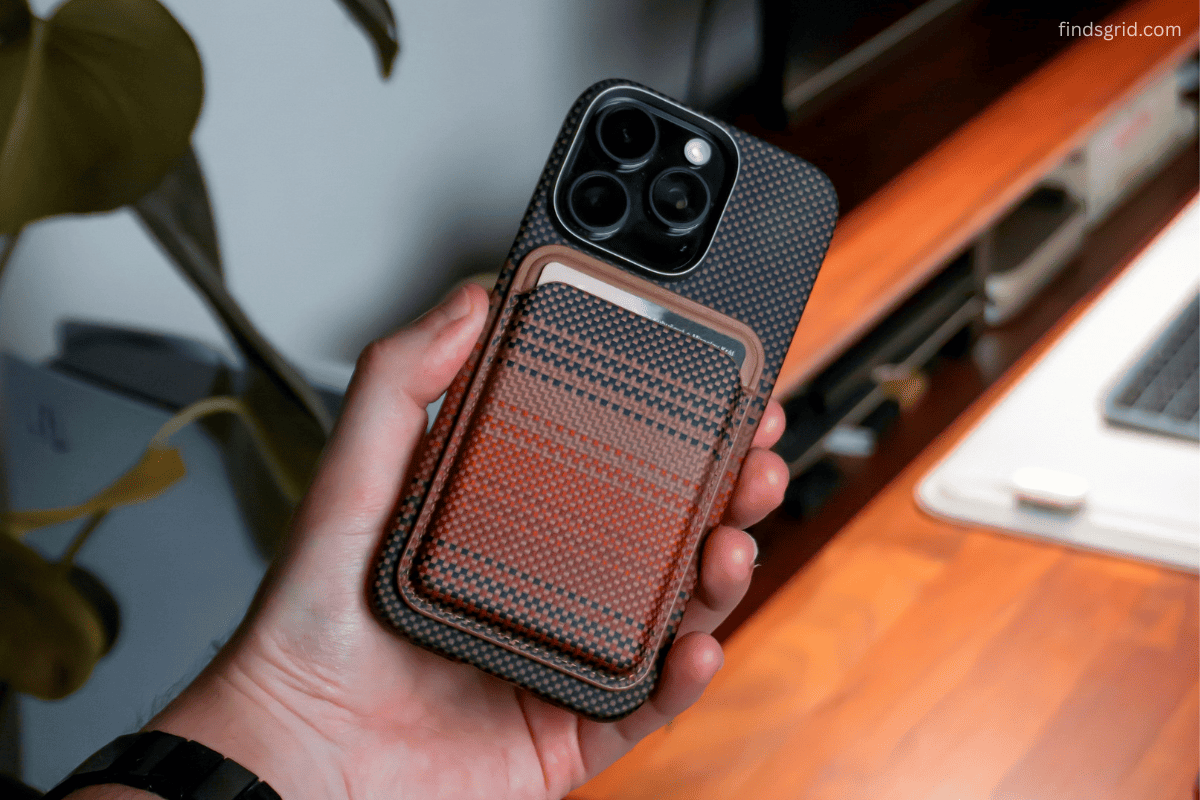
Are MagSafe wallets safe for credit cards? It’s the question almost everyone asks right before they try one, usually somewhere between clipping their phone to a magnet for the first time and wondering if their debit card just got quietly wiped clean. Picture this: you’re standing at a checkout counter, phone in one hand, and you realize your wallet isn’t attached to the back anymore. Or maybe you’re on the fence about switching to one of these slim magnetic wallets in the first place, because somewhere in the back of your mind you’re worried a magnet strong enough to hold your phone might also be strong enough to damage your card.
Both fears are common. Only one of them is really worth losing sleep over.
Myth vs. Fact, Right Off the Bat
Before going deep into the “why,” here’s the short version people are usually searching for when they ask whether MagSafe wallets are safe for credit cards:
- Myth: MagSafe magnets are strong enough to erase or damage your credit card data.
- Fact: Modern cards are built to resist magnetic fields far stronger than what any MagSafe wallet produces.
- Myth: All magnetic wallets perform the same, so any one will hold your phone securely.
- Fact: Magnet grade, alignment, and case compatibility all affect whether a wallet actually stays put.
- Myth: Adding location tracking to a wallet means carrying something bulky.
- Fact: Wallets with built-in Find My tracking are now just as slim as basic ones.
That’s the whole debate in a nutshell but let’s unpack each piece properly, because the details matter if you’re actually trying to decide what to carry every day.
So, Are MagSafe Wallets Safe for Credit Cards?
This is where most of the confusion online traces back to an outdated understanding of how cards actually work.
Your card carries three possible layers of technology: the EMV chip, the NFC antenna for contactless tap-to-pay, and on some cards a magnetic stripe. The chip and antenna aren’t magnetic components at all. They’re solid-state electronics, so a magnet sitting near them doesn’t corrupt or erase anything, the same way a magnet doesn’t erase data off a USB stick.
The magnetic stripe is the only genuinely magnetic element, and this is where the question of whether MagSafe magnets demagnetize cards actually has a technical answer. Stripes issued in the US today are almost universally “high-coercivity,” meaning it takes a seriously strong magnetic field, thousands of Oersteds to scramble the data. MagSafe-style magnets, even the stronger aftermarket versions, don’t come close to that threshold at the distance your card sits inside a wallet shell. Apple’s own guidance has only ever flagged older, low-coercivity stripes as a concern, and those are increasingly rare on US-issued cards.
Bottom line: for the vast majority of cardholders, MagSafe wallets are safe for credit cards in everyday use. The risk is theoretical, not practical.
Where Things Actually Go Wrong: Magnet Strength and Everyday Handling
If your card isn’t the thing at risk, what should you actually be paying attention to? Mostly, whether the wallet stays attached to your phone in real conditions.
So, how strong is a MagSafe wallet magnet supposed to be? Apple’s official ring uses N52-grade neodymium magnets, and most competing wallets try to match or beat that rating, often marketed in grams of holding force. But a high number on a spec sheet doesn’t guarantee a secure hold, because three other variables matter just as much:
- Case compatibility. A thick, non-MagSafe case or one with metal components can throw off alignment and quietly weaken the connection, even with a “strong” magnet.
- Surface grip. A wallet that relies purely on magnetic pull, with no texture at the contact point, is more prone to twisting off than one built with slight friction into the design.
- Pocket stress. Sliding a phone-and-wallet combo into a tight pocket applies sideways force, which behaves very differently than the straight-line pull-off force most magnets are actually rated for.
This is the real reason some magnetic wallets feel flimsy while others feel rock-solid, even when their spec sheets look similar.
Traditional vs. Magnetic vs. Smart: A Side-by-Side Look
| Feature | Traditional Leather Wallet | Basic MagSafe Wallet | Smart Trackable MagSafe Wallet | Winner |
|---|---|---|---|---|
| Profile/Bulk | Bulky, separate item | Slim, phone-attached | Slim, phone-attached | Smart Trackable |
| Card Capacity | High (6+ cards, cash) | Low-moderate (2-3 cards) | Moderate (up to 5 cards) | Traditional |
| Location Tracking | None | None (needs a separate AirTag) | Built-in Find My | Smart Trackable |
| Risk of Losing It | High | Moderate | Low | Smart Trackable |
| RFID Protection | Varies by model | Varies by model | Often built-in | Smart Trackable |
| One-Handed Access | Awkward | Easy | Easy | Tie (MagSafe types) |
Built-In Tracking vs. Squeezing in an AirTag
This is where the best trackable MagSafe wallet for iPhone actually earns its reputation, instead of just being a marketing buzzword.
The old workaround for wallet anxiety was dropping an AirTag into a card slot. It works, but AirTags are round, coin-sized, and noticeably thick, cramming one into an already-slim wallet either adds bulk or forces you into a separate pouch, which defeats the point of going minimal in the first place.
A genuine smart wallet with Find My tracking bakes the module into the wallet’s structure from the start, rather than bolting it on afterward. You still get real-time location, a “Play Sound” trigger, and Apple’s Find My network support, but without the extra thickness. There’s also a practical side benefit: when the tracker lives inside the wallet instead of being a separate accessory, you’re far less likely to forget to bring it along, or leave it behind in a different bag.
Building a Simpler, Trackable Everyday Carry
If you want a slim, trackable setup that combines strong magnets with built-in Apple Find My integration, check out our in-depth ESR Geo MagSafe Wallet Review to see how it handles daily real-world use.
The real goal isn’t to cram every card you own onto the back of your phone, it’s deciding what genuinely needs to be with you at all times, and letting a slim, trackable wallet handle just that.
Common Questions, Answered Quickly
Yes, but you’ll need to take the wallet off before charging, since it physically sits between your phone and the charging coil. Beyond that, it doesn’t affect the phone’s charging circuitry or battery health.
It appears in the Find My app just like AirPods or an AirTag would, using Apple’s crowdsourced network, so nearby Apple devices can anonymously help relay its location even outside your own Bluetooth range. You can check its last known spot or trigger a sound to help find it nearby.
Most slim designs are built for two to five cards before the stretch starts loosening the grip. Push much past that, and the added thickness pushes your cards further from the magnet, weakening the hold on your phone.
Final Takeaway
Most of the fear around whether MagSafe wallets are safe for credit cards comes from outdated assumptions about magnetic stripe technology that don’t really hold up against today’s cards. What’s actually worth your attention is magnet quality, proper alignment, and whether the wallet includes tracking because losing a slim wallet is a far more realistic risk than demagnetizing a card ever was. Start there, and the rest of your everyday carry gets a lot simpler.